
PicSift Guide
On-device photo processing explained
Understand what on-device photo processing means in PicSift, what stays on your iPhone, what Apple services may still do, and where the privacy boundary ends.
On-device photo processing means PicSift performs its photo-library review work on your iPhone instead of uploading your photos and videos to PicSift-operated servers for analysis. Media display, file-detail calculations, keep-or-remove decisions, cached metadata, and review progress are handled locally by the app.
It does not mean the iPhone never communicates with Apple or a service you deliberately choose. iCloud Photos may download and synchronize media, Apple services may process system requests, and sharing or contacting support sends information only when you initiate those actions.
What “on device” means in PicSift
PicSift uses Apple PhotoKit to work with the Photos library you authorize on the iPhone. Apple describes PhotoKit as the framework that gives apps access to assets managed by Photos, including media from iCloud Photos.
The core PicSift workflow looks like this:
| Stage | Where it happens | What happens |
|---|---|---|
| Request Photos access | iOS | You choose whether PicSift can access the library |
| Load an accessible item | iPhone and Apple PhotoKit | Photos provides the media and available metadata |
| Review the item | PicSift on iPhone | PicSift displays the item and relevant details |
| Leave unreviewed, mark as kept, or mark for removal | PicSift on iPhone | The status is stored in local app data |
| Confirm cleanup | PicSift and Apple Photos | PicSift requests the library change you approved |
| Sync or recover | Apple Photos and iCloud Photos | Apple manages cross-device changes and Recently Deleted |
There is no PicSift server in the middle receiving a copy of your library for the core review process.
What PicSift stores locally
To remember where you are and avoid recalculating the same information repeatedly, PicSift can store operational data in its local app container. This includes:
- whether an accessible item is unreviewed, kept, or marked for deletion;
- local asset identifiers used to associate a saved decision with an Apple Photos item;
- cached media details such as dimensions, duration, file size, dates, or camera metadata;
- locally calculated progress and library statistics;
- preferences, appearance, playback, and onboarding state;
- cached place names derived from location metadata already embedded in accessible media;
- StoreKit product and entitlement status supplied by Apple.
This local data is not a second copy of the photo library. It is the working state PicSift needs to provide the review experience.
Deleting PicSift normally removes its local app data from the device, subject to iOS behaviour and backups you control. It does not delete the Apple Photos library, and it does not cancel an active App Store subscription.
What PicSift does not send to its own servers
PicSift does not upload your photos or videos to PicSift-operated servers for processing. It also does not send the library to its own servers for machine-learning training, advertising profiles, or cross-app tracking.
The current app does not integrate third-party advertising, analytics, attribution, or crash-reporting SDKs. That reduces the number of external parties inside the app’s media-review path.
This is narrower and more precise than saying “nothing ever leaves the phone.” The next sections explain why that broader claim would be inaccurate.
Apple services may still use the network
iCloud Photos
If iCloud Photos is enabled, Apple can store full-resolution originals in iCloud, download media to the device, and synchronize edits or deletions between devices. With Optimize iPhone Storage, the iPhone may keep smaller local versions and request a higher-quality asset when needed.
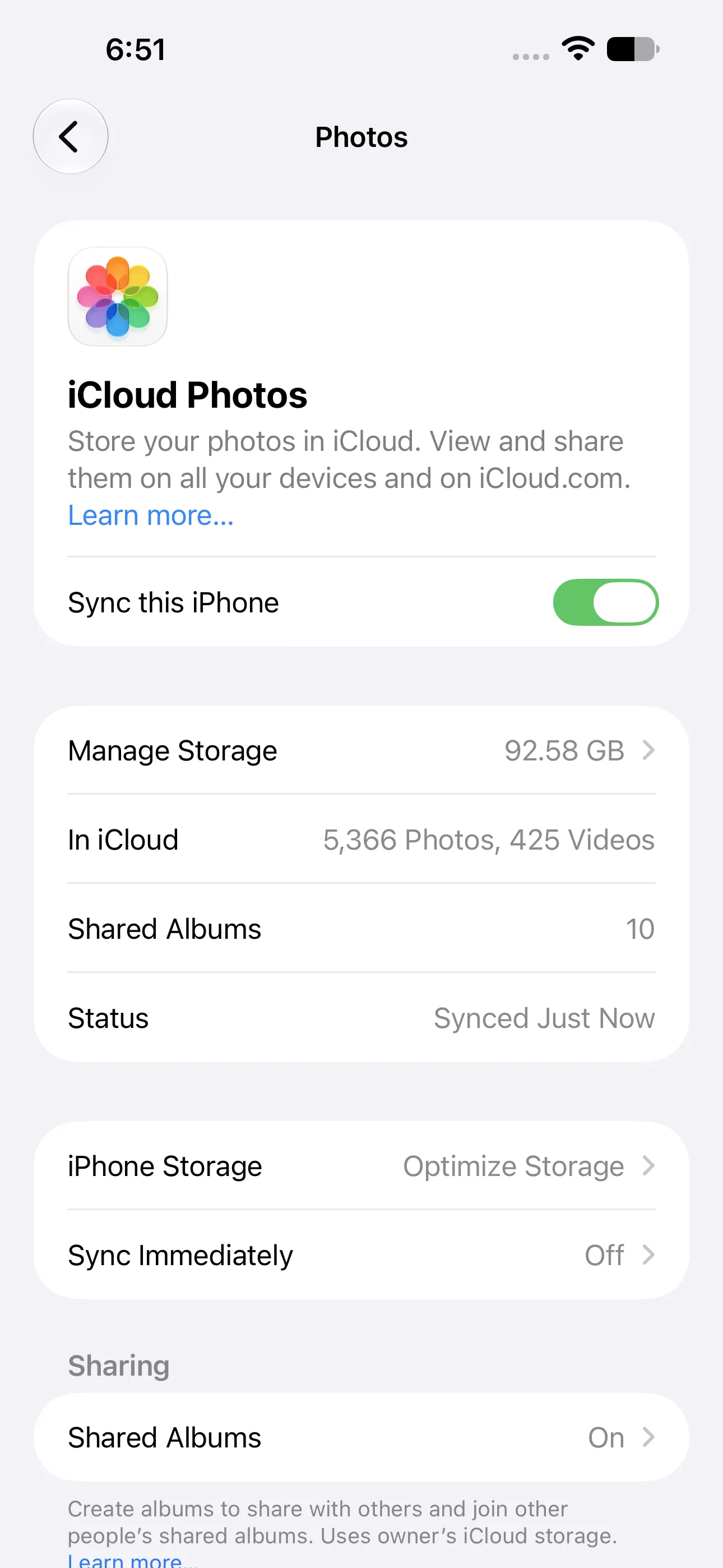
“On device” describes PicSift’s processing boundary; it does not disable Apple services such as iCloud Photos. Captured on iOS 27 with PicSift 1.3.
Apple documents this behaviour in Set up and use iCloud Photos. PicSift does not replace, proxy, or disable that Apple service. For the complete product boundary, read How PicSift works with iCloud Photos.
Location names
PicSift does not request your device’s current location. If an accessible photo or video already contains location metadata, the app may ask Apple MapKit or geocoding services to convert those coordinates into a readable place name.
Apple may process the coordinates to return that result. PicSift stores the resulting place name and a reduced-precision cache key locally so it does not need to repeat the same request unnecessarily.
Purchases and diagnostics
Apple StoreKit handles PicSift Pro purchases, renewals, cancellations, refunds, restoration, and entitlement information. Apple may also process App Store analytics, crash reports, and diagnostics according to your Apple and device settings.
PicSift does not receive your full payment-card details or Apple Account credentials.
“Data Not Collected” does not mean “data not processed”
PicSift’s App Store privacy label currently states Data Not Collected. In Apple’s disclosure framework, data processed only on the device and never sent to a developer or third party is not considered “collected” by the developer. Apple explains this distinction in App Privacy Details.
PicSift still needs to process photos, videos, metadata, and decisions locally to provide its features. “Data Not Collected” describes where that data goes; it does not mean the app is unable to read anything you explicitly authorize.
Apple also distinguishes data Apple collects through its own frameworks and services from data collected by the app developer. That is another reason to keep PicSift processing and Apple system processing separate when evaluating privacy.
Actions that intentionally send information elsewhere
Some actions are designed to transmit information because you explicitly choose a destination:
- Sharing or exporting: the iOS share sheet sends selected media to Messages, Mail, AirDrop, a social network, another app, or a storage provider you choose.
- Contacting support: an email sends the address, message, screenshots, and other details you decide to include to PicSift support.
- Using Apple services: iCloud Photos, MapKit, StoreKit, App Store analytics, and diagnostics operate under Apple’s terms and your settings.
- Visiting the website: hosting and network providers may process standard request information needed to deliver and protect the website.
These are not hidden uploads of the photo library by PicSift. They are separate actions or services with their own purpose and privacy boundary.
How iOS permissions limit access
An iPhone app cannot simply browse the Photos library without authorization. Apple explains that users can review and change app access to protected categories such as Photos in Settings in Protecting app access to user data.
Depending on the access iOS offers, you can choose:
- Full Access for a whole-library review;
- Limited Access for only selected photos and videos;
- No Access when you do not want the app to read the library.
Limited Access means PicSift’s counts, albums, and review progress cover only the assets iOS exposes to it. You can change or revoke access later in Settings.
What on-device processing does—and does not—protect against
Keeping PicSift’s core processing local reduces exposure to developer-operated media servers, server breaches, advertising SDKs, and remote account databases. It also means there is no PicSift cloud account containing your complete review history.
On-device processing is not a guarantee against every risk. Your security still depends on:
- the iPhone passcode and device security;
- Apple Account and iCloud security;
- the apps and services you choose when sharing;
- device and computer backups you control;
- people who can unlock or access the device;
- keeping iOS and installed apps updated.
Apple describes iPhone protections such as permission controls, Data Vault, code signing, and sandboxing in its platform security documentation. These system protections complement an app’s own data practices; they do not replace careful user choices.
A privacy check before reviewing
- Open Settings and confirm PicSift’s Photos permission matches the session you want.
- Check whether iCloud Photos and Optimize iPhone Storage are enabled.
- Protect irreplaceable originals with a separate copy before major deletion.
- Avoid attaching private media to support messages unless it is necessary.
- Review the destination before sharing or exporting an item.
- Inspect the final deletion group before confirming.
- Use Apple Photos to review Recently Deleted after cleanup.
For the full deletion workflow, follow How to clean up iPhone photos safely.
Frequently asked questions
Can PicSift employees see my photo library?
PicSift does not upload the library to PicSift-operated servers for processing, so the product does not provide a remote PicSift account or dashboard for viewing it. Support can see only information you deliberately send in a support request.
Does on-device processing work with iCloud Photos?
Yes. PicSift’s review logic remains on the iPhone, while Apple PhotoKit and iCloud Photos may provide or download the media being reviewed. Apple continues to control synchronization.
Does PicSift use my photos to train AI models?
No. PicSift does not upload your photo library to its own servers or use your media to train machine-learning models.
Why might PicSift contact an Apple service?
An iCloud-only original may need downloading, embedded coordinates may need conversion to a place name, StoreKit may need to validate a purchase, or Apple may process diagnostics according to your settings.
Where can I read the complete data policy?
Read the PicSift Privacy Policy. For a product-specific question, contact PicSift Support without attaching private media unless it is necessary.